Pickup and delivery your drivers can run from their phone
Drivers grab orders from every branch, plan their route, and pin each customer's door. Your counter sees every change as it happens.
Get it on Google PlayFree forever · 30 days of Pro · No credit card
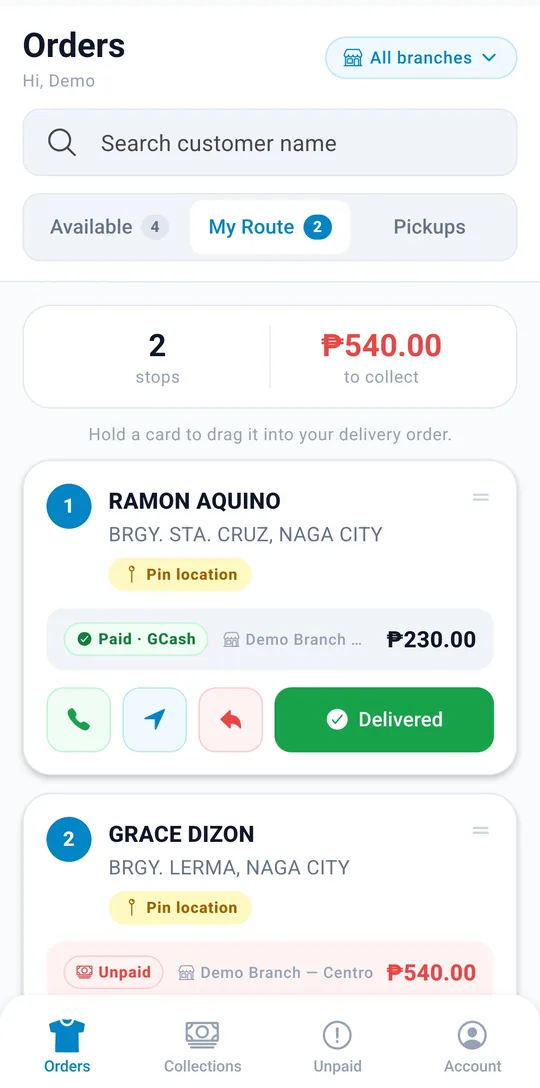
Everything for the road, in your driver's pocket
Real screens from the delivery app, running on a demo shop.
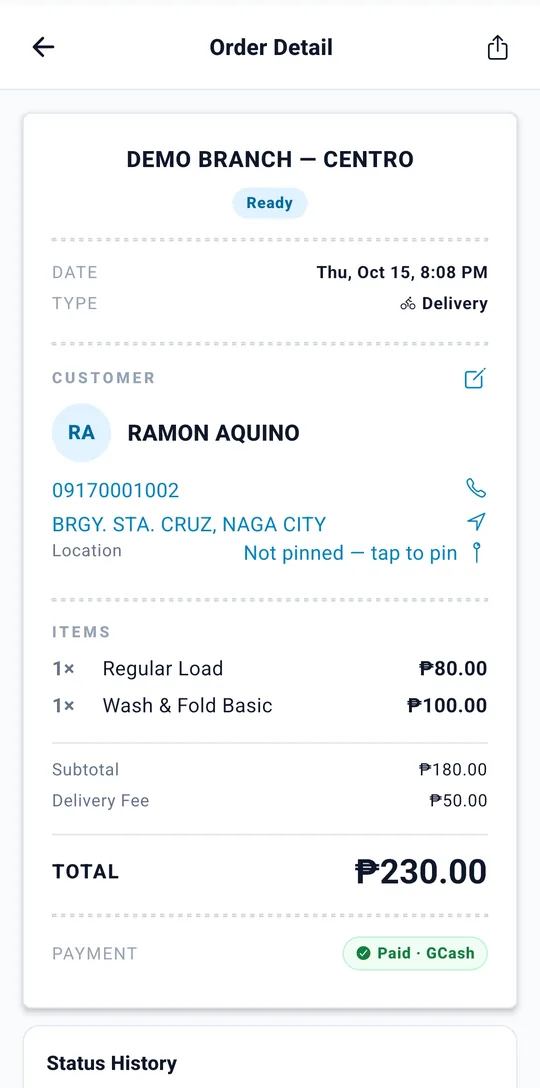
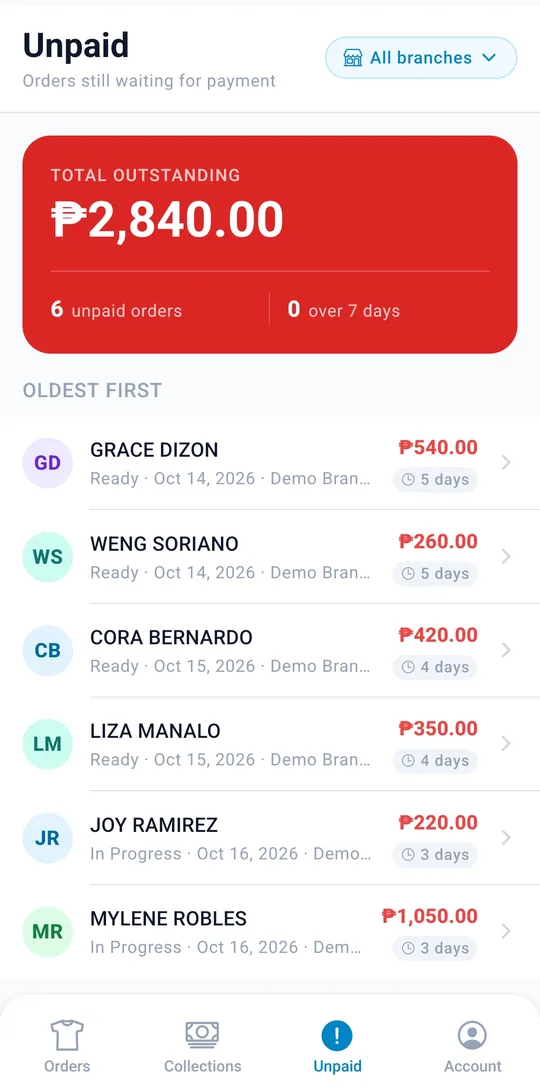
Everything a driver needs, nothing they don't
The delivery app shows drivers their jobs and the next step for each one. No reports, no settings, no price lists.
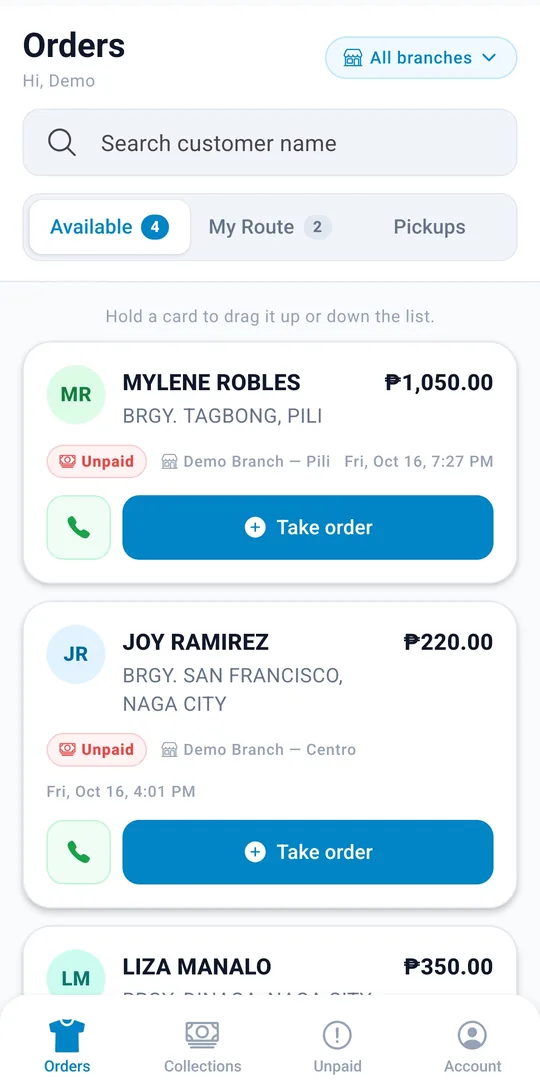
Grab orders in one tap
Ready orders from every branch wait in one list. Tap Take order and it is yours — if another driver got there first, the app says who.
Your route, in order
Drag stops into the order you will drive them, then call the customer or open directions right from each stop.
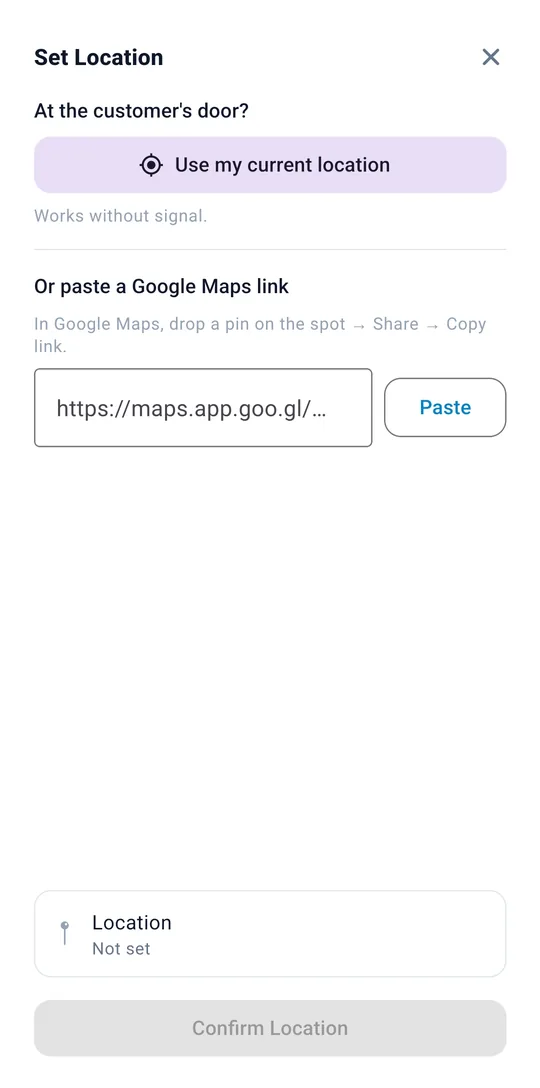
Pin it at the door
Save the customer's location with one tap, even without signal, or paste a Google Maps link.
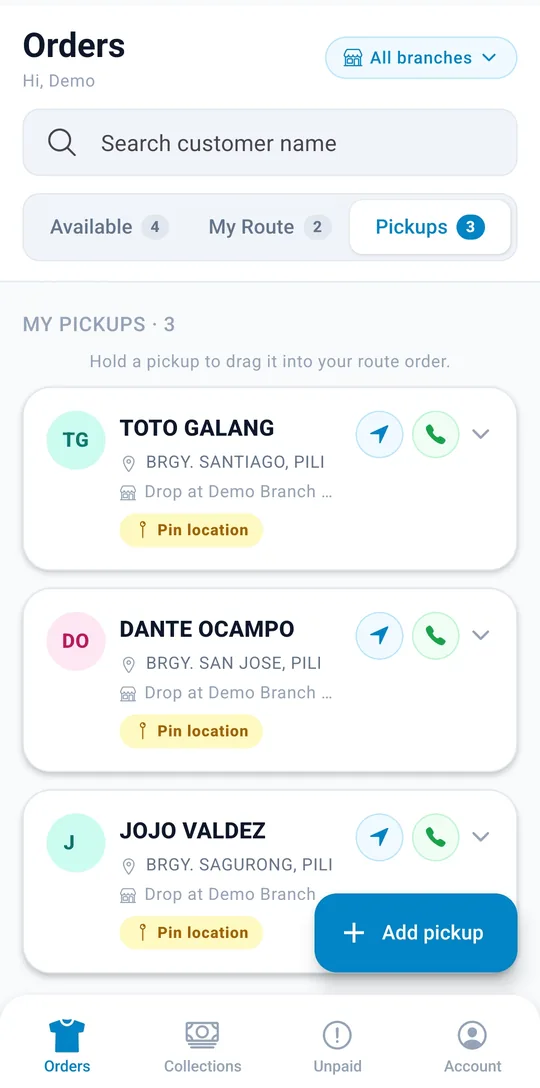
Add a pickup in seconds
Pick an existing customer or create a new one, choose which branch gets the drop-off, and it is on your list.
Bag count at the door
Drivers record how many bags they collected, so the counter knows what to expect before the laundry arrives.
Know who still owes
Unpaid orders are listed oldest first, with the total outstanding and how many days each one has waited.
Track cash to remit
Collections totals the cash a driver picked up today, yesterday, or over the last 7 days, so handing it over is quick.
Delivered means done
Marking a delivery as delivered completes the order at the counter too. Staff never have to call a driver to double-check.
Works with patchy signal
Updates are saved on the phone and sync once the driver is back online, and retries never create duplicate jobs.
From the customer's door to your shop and back
Every pickup and delivery moves through the same few steps, and everyone on your team sees the same status.
- Pickups start with a request A driver adds the pickup with the customer's details and pinned location. A driver claims it, collects the bags, and drops them off at the shop.
- Deliveries start at the counter When an order is ready, it appears in the pool. A driver claims it and marks it delivered once it reaches the customer.
- Plans change, jobs don't get lost A driver can release a job they can't take, and a failed delivery goes back to the pool with the reason attached.

Pickup
From the customer to your shop
- Requested by the driver
- Claimed by a driver
- Picked up with bag count
- Received at the shop
Delivery
From your shop back to the customer
- Ready for delivery
- Claimed by a driver
- Delivered order completed
You stay in control of every trip
The delivery app works hand in hand with your admin and staff apps.
Every pickup and delivery order shows up in the admin app across all branches, with its status and payment.
The counter sees each pickup and delivery for their branch and its status, so they know what is coming in and what has gone out.
Drivers only see what they need to do the job: open work, their claimed jobs, and the customer details for each stop.
Get your drivers on the road in three steps
- 1 Create your shop account Sign up for a free trial and set up your branches and price list.
- 2 Give each driver a sign-in Every driver gets their own delivery account, so you always know who is holding which job.
- 3 Claim the first job Drivers sign in on their phone, see the open pickups and deliveries, and claim the ones they can take.
Questions about the delivery app
Can a driver serve more than one branch?
Yes. Drivers see open pickups and deliveries from every branch of your shop and can claim any of them. Staff still only see their own branch.
What happens if two drivers tap the same job?
The first claim wins. The second driver is told who already has the job, so nobody makes the same trip twice.
What if a delivery fails?
The driver marks it as failed with a reason, such as the customer not being home, and the order goes back into the pool for another try.
Does the app work without mobile data?
Yes. Driver updates are stored on the phone and sent once the connection is back, so nothing is lost on the road.
Who can create pickup requests?
Drivers, right from the delivery app: pick an existing customer or add a new one. Staff at the counter can see every pickup for their branch and its status, so they know what is on the way.
Which plan includes the delivery app?
Starter and Pro, both with unlimited driver accounts. You can try it free for 30 days with no credit card.
Works with your staff and admin apps
Take and manage orders at their branch, even offline, without the distraction of admin tools.
Explore the staff app →Full visibility across every branch — orders, reports, and account settings.
Explore the admin app →Put your drivers and your counter on the same page
Start free with 30 days of Pro and add your drivers today. No credit card required.